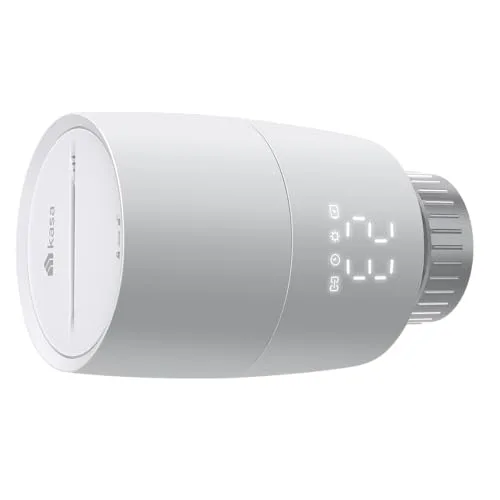
TP-Link Kasa KE100 Expansion at a glance
In short: the TP-Link Kasa KE100 Expansion scores 8,0/10 in our thermostat review (from €32). Biggest strength: cheap expansion. Main compromise: hub required.
All specifications come from manufacturer data sheets and the Amazon catalogue and were cross-checked before publication. The rating is an editorial overall assessment based on this data; we do not trial products ourselves.
TP-Link Kasa KE100 Expansion: what works, what doesn't?
What works well
- Cheap expansion: Much cheaper than a second complete kit, ideal for upgrading room by room
- Child lock: Prevents children from changing the setting by accident, a plus the kit thermostat partly lacks
- Easy DIY mounting: Unscrew the old valve, fit the Kasa, set up with the in-app guide, no tradesperson needed
- Long standby time: Low-power radio technology means rare battery changes in continuous use
Points of criticism
- Hub required: Without an existing KE100 kit with KH100 hub the unit does not work, no standalone operation
- Kasa app only: Control runs exclusively through the Kasa app, not Tapo H100/H200
- No 5 GHz: Limited to 2.4 GHz Wi-Fi like the whole system
Specifications in detail
| Type | Smart radiator thermostat (expansion unit) |
| Requirement | Kasa hub from KE100 kit required |
| Valve connection | M30x1.5, 6 adapters (RA, RAV, RAVL, CAL, M28, GIA) |
| Radiators per hub | up to 32 |
| Smart home | Matter (Apple Home, Alexa, Google Home, SmartThings) |
| Automatic | Schedules, geofencing, open-window detection |
| Safety | Child lock |
| Rechargeable/standard battery | Low-power radio technology, long standby time |
| Wireless | 2.4 GHz Wi-Fi (no 5 GHz) |
Build quality & everyday use
What carries the TP-Link Kasa KE100 Expansion in everyday use: cheap expansion (much cheaper than a second complete kit, ideal for upgrading room by room) and child lock (prevents children from changing the setting by accident, a plus the kit thermostat partly lacks). We have to be honest about the weaknesses: hub required (without an existing KE100 kit with KH100 hub the unit does not work, no standalone operation).
If you set the device up to save space, make sure it stands on a stable, level surface with some air around it. This protects the mechanics and electronics in continuous use.
Who is the TP-Link Kasa KE100 Expansion suited to? (buying advice)
Perfect for:
- ✓Existing Kasa KE100 users adding rooms
- ✓Households with children thanks to the child lock
- ✓DIY upgrade without buying a second hub
Less suitable for:
- ✕Beginners without the KE100 kit and hub
- ✕Anyone using the Tapo system instead of Kasa
Similar thermostat models
Frequently asked questions about the TP-Link Kasa KE100 Expansion
Does the expansion work without the KE100 kit?
Is the expansion worth it compared with a second kit?
Does the expansion have a child lock?
Verdict: is the TP-Link Kasa KE100 Expansion worth it?
A solid option with a clear profile: if you can live with hub required, from €32 you get mainly one thing: cheap expansion. It suits best: existing Kasa KE100 users adding rooms.
If you want to compare alternatives, you will find detailed data and reviews on our thermostats comparison page.
Buy now at the best price (UK) Buy now at the best price (US)